 Instagram Story Viewer
What Does the Green Circle Mean on Instagram? Close Friends Guide
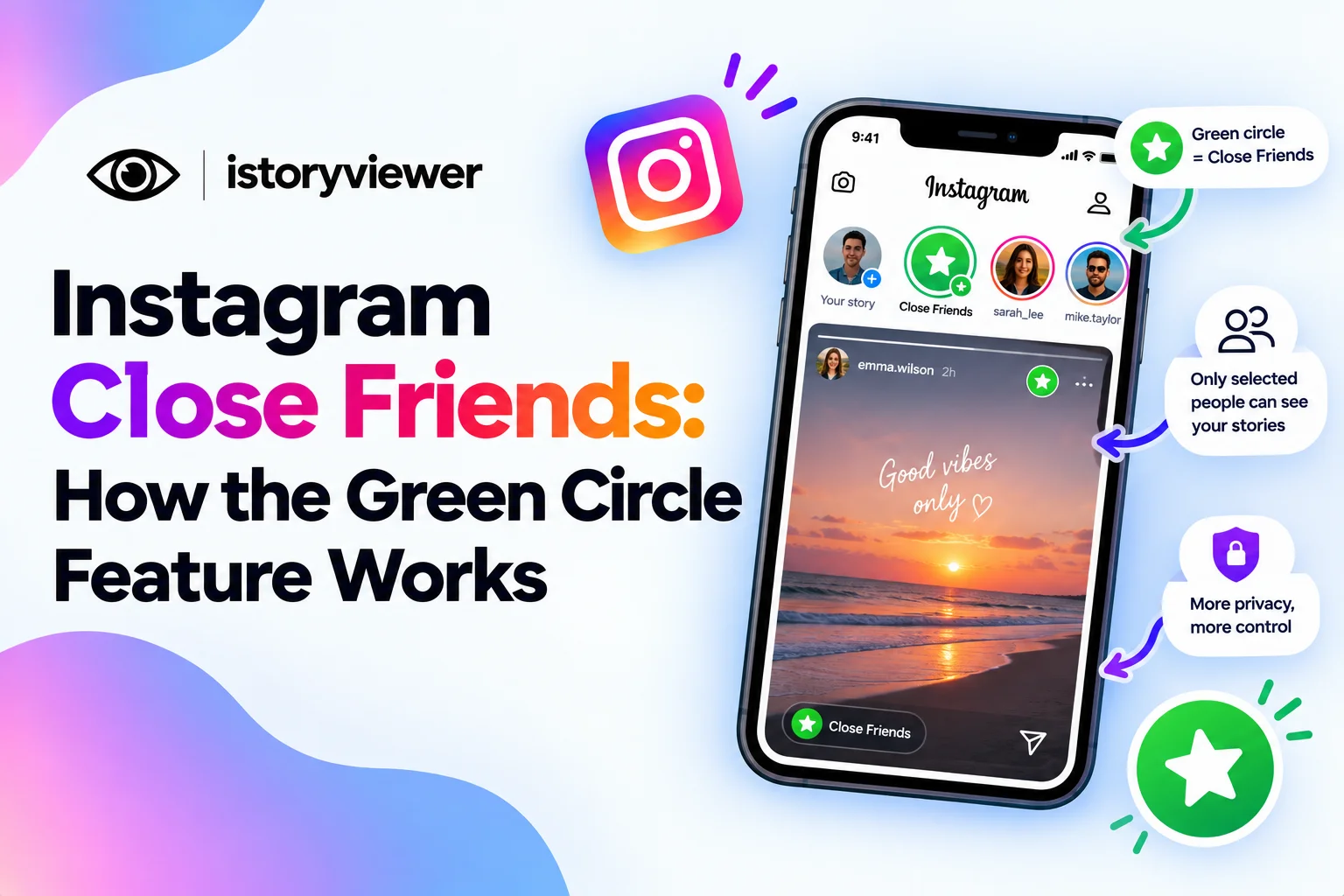
You spot a green circle around a friend’s story instead of the usual colors. That small change means something special. It tells you the story was shared with a smaller, hand-picked group.
Below, you’ll learn how Instagram Close Friends works and what the green circle means. You’ll also see how to build your own list and what stays private. Every detail here comes from Instagram’s own help pages. It takes only a minute to set up.
What Is Instagram Close Friends?
Instagram Close Friends is a private list of people you choose yourself. The Instagram Help Center says you can share posts, notes, reels, and stories with just that list. Everyone else who follows you won’t see that content.
Pew Research Center found eight in ten U.S. adults ages 18 to 29 use Instagram. With audiences that big, a smaller sharing circle makes sense.
The feature lets you share more personal moments without changing who follows you. You can keep a public account and still post privately to a few people. It’s handy for casual updates, inside jokes, and early previews. Close Friends content follows the usual rules too, so stories still expire after a day.
What the Green Circle on Instagram Means
A green ring around someone’s profile photo means they shared something with their Close Friends. If you can see it, you’re on their list. The Help Center notes that list members may see that green ring. They also see a Close Friends label when viewing that content.
The regular story ring looks different, so the green stands out. Regular stories from the same person still show their normal ring. That’s how you know which updates were meant for a smaller group.
A Close Friends label can also appear on notes and reels shared to the list.
How to Create or Edit Your Close Friends List
Setting up the list takes just a few taps. Here’s how to do it:
Tap your profile picture to open your profile.
Tap the menu in the top right.
Under How you use Instagram, tap Close Friends.
Tap Add next to anyone you want on the list.
Tap Remove to take someone off the list.
Tap Done to save your changes.
You can also use the search bar to find a specific person. Update the list whenever your circle changes. There’s no need to rebuild it each time you post. When you post a story, choose Close Friends to share with only that group.
Privacy Rules Behind the Green Circle
Close Friends comes with a few rules that protect everyone involved:
No One Gets Notified
Instagram doesn’t notify people when you add or remove them. That means you can adjust your list without awkward conversations. People only learn they’re on it when they see your green content. Removing someone happens just as quietly. Nobody sees a message about the change.
No One Can Ask to Join
There’s no way for someone to request a spot on your list. Instagram confirms that no one can request to be added. Only you decide who’s in. That keeps pressure off you and your followers alike. It also means nobody can pester you through the app.
Reel Interactions Are Shared Within the List
Close Friends reels work a little differently from stories. If someone on your list likes, comments, or shares that reel, other list members can see it. Their username and interaction become visible inside the group. Keep that in mind before commenting on a Close Friends reel.
Can You View Someone’s Close Friends Story Without Being on the List?
No, Close Friends stories are visible only to people on that list. There’s no setting, trick, or app that changes this. Third-party story viewers can’t open them either, including ours.
Our story viewer at istoryviewer.com only works with public stories. Close Friends content stays limited to the people the owner picked. That’s exactly how it should work.
If you used to see someone’s green stories and now don’t, they may have changed their list. It could also mean they simply haven’t posted for Close Friends lately. Either way, it’s their choice.
Close Friends Reels vs Public Reels You Can Save
Close Friends reels are meant for a small group, so they stay private. Public reels are different, since anyone can watch them. Here’s a quick way to tell what you can save:
Public reels can be saved with our free Reels Downloader as clean MP4 files.
Close Friends reels stay private, and no tool can save them.
Private account reels are limited to approved followers and can’t be downloaded.
The downloader only needs a reel’s public web address; no Instagram login required. You’ll get an MP4 with the original audio, ready to watch offline. Saved reels belong in your personal collection, not in your own feed. If you’d like to share one, ask the creator first and tag them clearly.
Frequently Asked Questions
What does the green circle mean on Instagram?
A green circle means the story was shared with that person’s Close Friends. If you see it, you’re on their list. Regular stories from the same account still use the normal ring. Only list members ever see the green version.
Does Instagram notify someone when you add them to Close Friends?
No, Instagram sends no notification when you add or remove someone. People usually realize they’re on the list when they see your green content. Removing them is just as quiet. You can update the list as often as you like.
Can I remove myself from someone’s Close Friends list?
Only the list’s owner can edit it. So the person who made the list decides who stays on it. If their content isn’t for you, you can mute their stories instead. Muting hides them from your feed without unfollowing.
Is there a limit to how many Close Friends you can have?
Instagram hasn’t published a limit. The feature works best with a small, trusted group. A huge list makes your Close Friends content feel less personal. Keep it to people you’d share personal moments with. You can trim it anytime without notifying anyone.
Does being on Close Friends mean I’m someone’s top friend?
It means they trust you with more personal content. It doesn’t rank you above anyone else on their list. Instagram does weigh closeness when ranking stories in your feed. Still, that doesn’t explain the order of story viewers either.